On this page
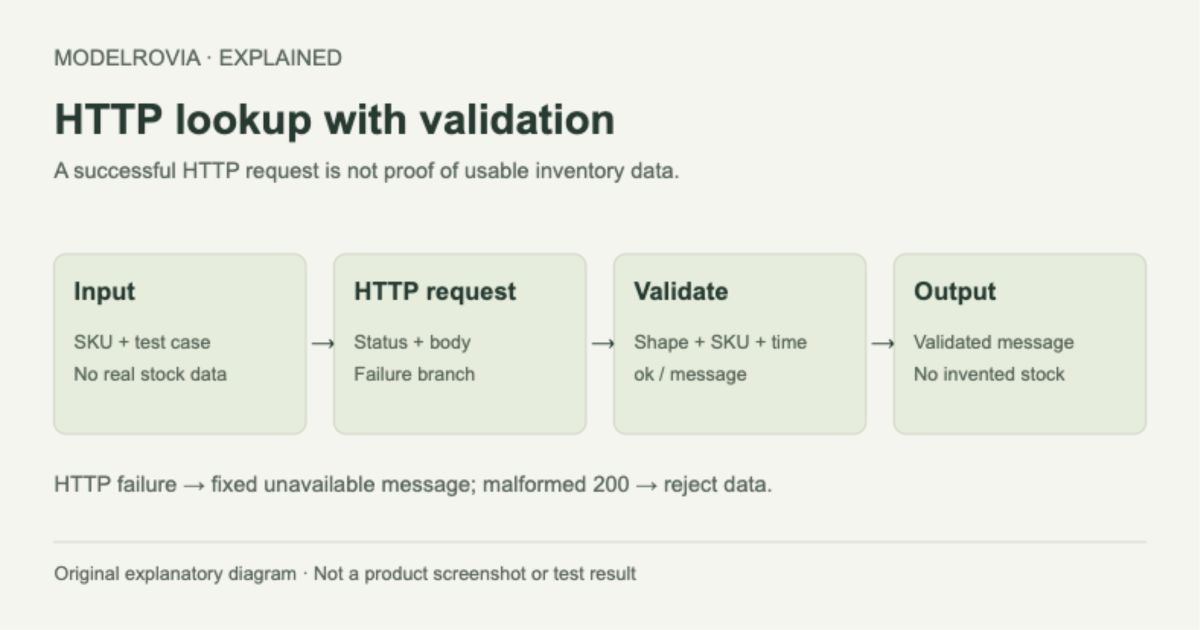
Use an HTTP node for the lookup, then validate its status and JSON before displaying inventory. The recipe here includes a runnable local fixture and a deterministic validator; an LLM is not needed for this task.
The mock and validator were checked locally with synthetic responses. The Dify node configuration follows official documentation, checked November 1, 2026. We have not imported or executed the graph in an authenticated Dify workspace. The sample stock count and warehouse are invented test data, not a real business’s inventory.
Run the synthetic inventory service
Download dify-inventory-mock.py. In its directory, run:
python3 dify-inventory-mock.pyIt binds to loopback at port 8765. In a second terminal, check each case:
curl -sS 'http://127.0.0.1:8765/inventory?sku=CEDAR-01&case=ok'
curl -sS 'http://127.0.0.1:8765/inventory?sku=CEDAR-01&case=missing'
curl -sS 'http://127.0.0.1:8765/inventory?sku=CEDAR-01&case=unavailable'
curl -sS 'http://127.0.0.1:8765/inventory?sku=CEDAR-01&case=malformed'
The cases return HTTP 200 with valid fields, HTTP 404, HTTP 503, and HTTP 200 with a wrong field type, respectively. Use curl -i when you also want the status and headers. Stop the service with Ctrl+C.
Reachability matters: Dify Cloud cannot call your computer’s 127.0.0.1. A container’s loopback is also not the host’s loopback. To use the mock from Dify, run it on a controlled address reachable from the Dify server, using --bind only after checking the network scope. On Docker Desktop a host service can use the host gateway route, but it must listen on an appropriate interface. Do not expose an internal real inventory system for this exercise. Our local checks only use loopback; they do not prove Cloud/container routing works.
Configure a Workflow app
Create a Workflow with these nodes:
| Node | Configuration |
|---|---|
| User Input | Add text fields sku and case; use CEDAR-01 and ok for the first run |
| HTTP Request | GET your reachable /inventory URL; add query parameters sku and case using the input-variable picker |
| Code | Map the HTTP node’s status_code and body, plus the original SKU as expected_sku |
| Output | Return the Code node’s message; optionally include ok for the caller |
There is no authentication on the synthetic mock. For a real service, use a secret environment variable in the credential control, not in the query string or prompt. Keep TLS verification enabled for HTTPS services.
Configure a failure branch for HTTP-node execution failures and return a fixed unavailable message on that branch. Do not let a failed node fall through into a generation step. Whether a non-2xx response is exposed as output or handled as a failed node depends on the node’s error settings: inspect the trace for 404 and 503 in your version. If it takes the failure branch, the generic unavailable result is acceptable for this first graph; it is not a verified item-not-found result. Distinguish 404 only when the actual status is available to your validator.
Validate the response in Code
Download dify-validate-inventory.py and paste its complete main function and imports into the Python Code node. The signature is:
"""Dify Code node function. Synthetic fixture validation, not an LLM result."""
import json
from datetime import datetime

def main(status_code: int, body: str, expected_sku: str) -> dict:
    fail = {'ok': 0, 'message': 'Inventory is temporarily unavailable.', 'quantity': 0}
    if status_code == 404:
        return {'ok': 0, 'message': 'Item not found.', 'quantity': 0}
    if status_code != 200:
        return fail
    try:
        data = json.loads(body)
        if not isinstance(data, dict):
            return fail
        if data.get('sku') != expected_sku:
            return fail
        q = data.get('available')
        warehouse = data.get('warehouse')
        stamp = data.get('updated_at')
        if type(q) is not int or q < 0 or not isinstance(warehouse, str) or not warehouse.strip():
            return fail
        if not isinstance(stamp, str):
            return fail
        if datetime.fromisoformat(stamp.replace('Z', '+00:00')).tzinfo is None:
            return fail
        return {'ok': 1, 'quantity': q,
                'message': f'{expected_sku}: {q} available in {warehouse}, updated {stamp}.'}
    except (ValueError, TypeError):
        return fail
Map the three arguments from the upstream variables. Declare output fields ok (Number: 1 for accepted, 0 for rejected), message (String), and quantity (Number). The implementation rejects malformed JSON, a different SKU, negative or non-integer quantities, a missing warehouse, and an invalid or timezone-free timestamp. The Output must use message, not turn a failure’s fallback quantity into a stock claim.
Use the Code-node documentation for the argument/output controls. This function performs no network requests; HTTP access stays in the HTTP node.
Check the four paths
| Mock case | Acceptance condition |
|---|---|
ok |
Shows CEDAR-01, seven units, Bristol, and the source timestamp |
missing |
No invented stock; item-not-found only if the status reaches Code |
unavailable |
Fixed unavailable result or the explicit failure branch |
malformed |
Validation fails even though HTTP returned 200 |
The local fixture check record covers the mock’s HTTP responses and the validator, not a live Dify run. A real service also needs appropriate request timeouts, redacted logs, and bounded retries. Repeating a read and repeating an order-creation request have different consequences; do not reuse this retry design for writes without an idempotency policy.
For document-backed answers rather than live structured records, use the Classic knowledge Chatflow.
Sources & references
Written by Modelrovia Editorial. Our standards distinguish official claims from observed results.
How we research and test →