On this page
The first useful test of a knowledge chatbot is not whether it can summarize a document. It is whether it answers from the right passage and declines questions the document cannot answer. Start with one controlled file before uploading a whole company drive.
This tutorial uses Dify’s current knowledge and Chatflow concepts, checked November 1, 2026. We have not deployed the workflow or measured retrieval accuracy. The sample policy below is fictional material you can reproduce, not a real company’s terms.
Create a source with known answers
Save this as sample-workshop-policy.txt:
Cedar Workshop — sample policy, revision A
Online sessions can be rescheduled until 24 hours before the start.
In-person sessions can be rescheduled until 72 hours before the start.
Materials are supplied for in-person sessions only.
This document does not specify refund terms or international shipping.
These near-matching rules make a better test than a paragraph with only one possible answer. You know exactly which number belongs to which session type.
Create a Classic knowledge base
In Dify Cloud, configure the needed provider under Integrations → Model Provider, using workspace permissions and a billing arrangement you understand. Generating answers and indexing content are different operations; make sure the selected knowledge configuration has the models it needs.
Use a Classic Knowledge Base for this particular exercise. The Classic retrieval node searches that kind of base; do not connect it to an Agent Knowledge Base. This choice fixes the path for the instructions below, rather than leaving two incompatible paths to combine.
Create a ready-to-use Classic base, upload the text file, and select its index configuration. For High Quality indexing, configure a supported embedding model in your workspace before processing. Retain the default chunking for this tiny file, inspect the preview, and wait until indexing finishes. Confirm both deadlines survived with their session labels. If the current workspace cannot create this knowledge type, stop and use the matching Agent Knowledge Base documentation instead; these node bindings are not interchangeable.
Wire the Chatflow explicitly
Create a Chatflow, not a Workflow app. Add the following nodes and connect them in order:
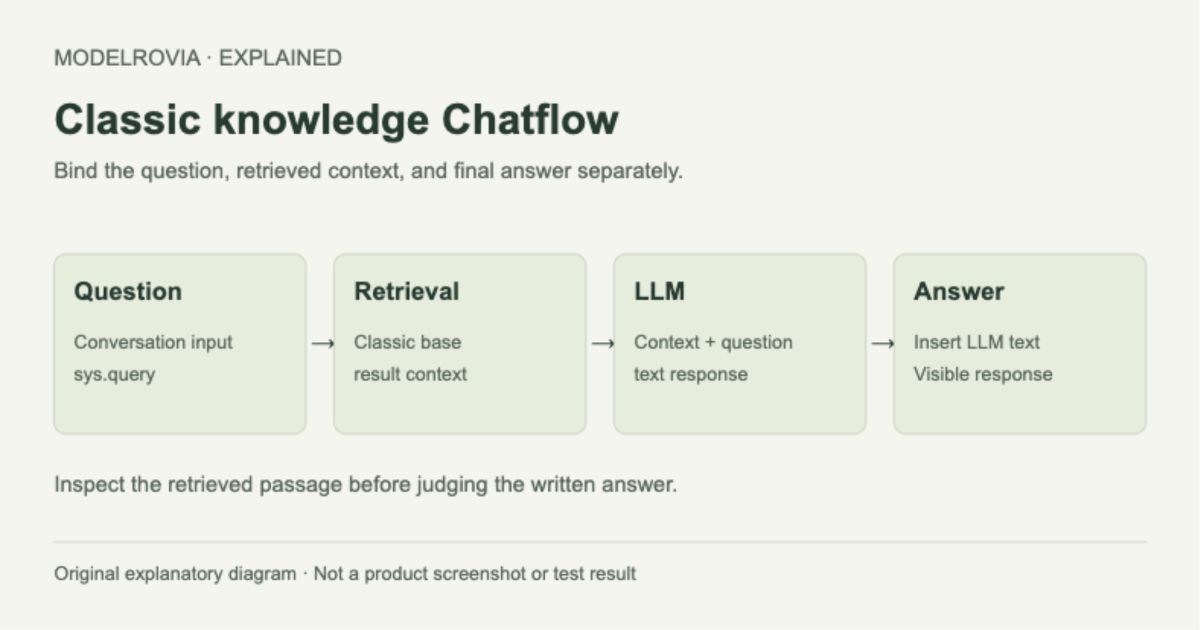
| Node | Configure | Output consumed next |
|---|---|---|
| User question / Start | Use the conversation question, normally sys.query |
Retrieval query and LLM user message |
| Classic Knowledge Retrieval | Choose the sample Classic base; select the question as query | result context |
| LLM | Select a configured chat model; bind retrieval result to Context |
text |
| Answer | Insert the LLM node’s text using the variable picker |
Visible chat response |
Use the variable picker, which creates the actual references for your node IDs. In the LLM’s Context control, select the retrieval output; in the user-message field insert the original question. In its system message, combine the instruction below with the bound Context value:
Answer only from the supplied workshop-policy context.
Keep online and in-person deadlines separate.
If the context does not answer the question, reply:
"I could not find that in the workshop policy."
Do not infer refunds from rescheduling rules.
Identify the passage that supports each stated rule.
The LLM context documentation explains the retrieval-to-context connection. The Answer node defines the final Chatflow response. A line drawn between nodes is not a substitute for selecting the input variables.
Run the Chatflow’s preview with one question, then inspect the retrieval result and the LLM input in the run trace. The sample file should appear as the context source. If it does not, fix the binding before changing the writing prompt. This configuration follows documentation checked November 1, 2026; an authenticated Dify session has not been executed for this article.
Test retrieval before judging writing
| Question | Expected evidence or behavior |
|---|---|
| Can I move an online session 30 hours ahead? | Online rule: 24 hours |
| What about an in-person session 30 hours ahead? | In-person rule: 72 hours |
| Do online sessions include materials? | Materials apply only to in-person sessions |
| Can I get a refund? | Not found; no invented refund rule |
Inspect retrieved passages as well as answers. If the passage is missing, investigate indexing or retrieval settings. If the correct passage is present but the answer is wrong, investigate the generation prompt and model. Raising retrieval limits indiscriminately can add conflicting context.
Re-test after an update
Change only the online deadline to 48 hours, process the revised source, and repeat the same questions. Confirm that obsolete content is removed or clearly superseded. Keep revision labels so a stale answer is diagnosable.
This small test does not establish production readiness. It gives you a repeatable baseline before adding permissions, multiple sources, and real customer data. For parser-heavy documents, compare the different starting point in Dify versus RAGFlow.
Sources & references
Written by Modelrovia Editorial. Our standards distinguish official claims from observed results.
How we research and test →